Online Impersonation: How to Check If Someone is Using Your Face or Photos
Stanley Wiggins
September 24, 2026
7 min read
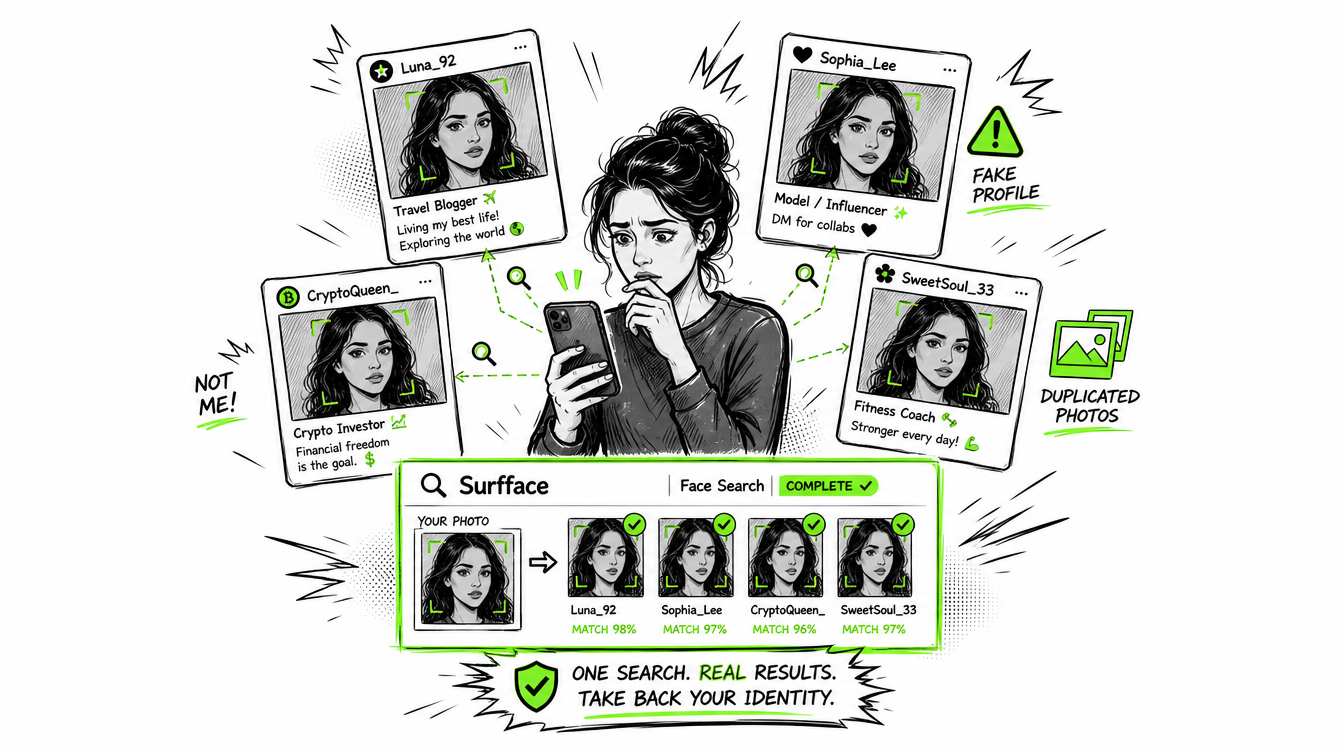
Online impersonation happens when someone uses your face, photos, name or identity to pretend to be you or mislead others. It may start as a fake profile using your photos, but it can turn into scams, harassment, reputation damage or identity misuse.
This matters because online fraud is no longer rare. According to Pew Research center:
73% of U.S. adults have experienced some kind of online scam or attack, 29% have had a personal online account hacked and 21% have lost money because of an online scam or attack.
If you are searching “someone is impersonating me online” or “how to find out if someone is using my photos,” act fast. Search your face online, save evidence, report the fake account and keep monitoring. Surfface helps by finding where a face appears across public websites, news, blogs, social media profiles and available U.S. public records such as mugshots and sex offender registries.
What is online impersonation?
Online impersonation is when someone pretends to be another person on the internet. They may use your face, your public photos, your name, your job title, your location or pieces of your personal story.
In many cases, the impersonator does not need to hack your account. They can simply copy photos from your public Instagram, Facebook, LinkedIn, dating profile, old blog, school page or news mention. Then they build a new profile around your face.
That fake profile may be used to:
- Ask your friends for money
- Message strangers under your identity
- Catfish people on dating apps
- Promote fake investment offers
- Create adult-content ads or spam pages
- Damage your reputation
- Make another scam profile look more believable
This is why “someone using my photo” is not a small issue. Your face can become the bait.
Why someone may use your face or photos online
Most impersonation has a purpose. The person stealing your image usually wants trust, attention or money.
A scammer may use your photo because you look real and approachable. A fake dating profile may use your face to start emotional conversations. A fraud account may use your photo to make a fake business page look legitimate. A troll may use your image to embarrass you or make you look connected to something you never did.
Pew found that scam attempts are constant across common digital channels. A majority of U.S. adults report getting scam phone calls, emails or texts at least weekly and about one-third get scam messages on social media at the same frequency.
That is the environment where online impersonation grows. Scammers need believable faces. Public photos give them material.
Signs someone is impersonating you online
You find a fake profile using your photos
The clearest sign is a profile that uses your face but has another name, location, age, job or biography. It may copy one of your photos exactly or use a cropped version from your public profile.
Look closely at the details. Many fake profiles have strange usernames, few posts, generic captions, sudden activity, inconsistent locations, low-quality profile text or followers that look fake.
Someone is using my photos on Instagram
Instagram impersonation often appears as a duplicate account. It may use your profile photo, copy your bio and follow your real friends. Sometimes it sends messages asking for money, crypto investments, votes, codes or urgent help.
Instagram says users can report accounts that pretend to be them or someone they know.
Someone is using my photo on Facebook
On Facebook, impersonation may appear as a cloned profile, fake Page, marketplace scam, dating-style profile or Messenger scam. The account may add your friends and then message them.
Facebook states that impostor profiles and Pages pretending to be you or someone else are not allowed and can be reported.
Your friends receive strange messages from “you”
If people ask whether you sent a link, requested money or created a new account, treat it seriously. Many impersonators first target the people around you because they already trust your face and name.
Your photo appears in places that do not match your life
A photo of you on an adult-content page, scam ad, suspicious dating profile, fake business page or public forum may be a sign of misuse. Even if the page does not use your real name, the photo can still harm your reputation.
How to find out if someone is using my photos
Start with a face search
A standard image search may only find exact copies of a picture. That helps if someone reused the same photo without changing it. But many impersonators crop, filter, resize or repost your photo in a different context.
A face search engine is built for a different question: where does this face appear online?
With Surfface, you upload a clear face photo and search public sources for matches. Surfface can help find appearances across public websites, news, blogs, social media profiles and available U.S. public records. That makes it useful when you are trying to check whether a face is being reused outside its original context.
For best results, use a clear photo where the face is visible. Avoid sunglasses, heavy filters, side angles, extreme blur or group photos where the face may be hard to detect.
Search Instagram and Facebook directly
If you suspect someone is using your photos on Instagram or Facebook, search your name, nicknames, old usernames and common misspellings. Also search your photo captions if they were copied from your real account.
Check suspicious profiles that follow your friends. Cloned profiles often target people already connected to you.
Use reverse image search for exact copies
Reverse image search can still help. It is useful when an impersonator copied the same image file or posted a near-identical version. Try searching your most public photos, profile pictures and images that appear on old accounts.
The limitation is simple: reverse image search may miss the same person in a different photo. That is why face search and reverse image search work best together.
Search your name plus image-related phrases
Use search queries like:
- “Your name” + “Instagram”
- “Your name” + “Facebook”
- “Your name” + “dating”
- “Your username” + “photo”
- “Your name” + “profile”
This can reveal copied bios, fake profile pages or old pages you forgot existed.
Ask friends to check what they can see
Some fake profiles block the real person but remain visible to friends. Ask someone you trust to search your name, check mutual followers and send screenshots of anything suspicious.
How Surfface helps detect online impersonation
Surfface is designed for photo-based people search. Instead of asking only “where is this exact image file,” Surfface helps answer “where does this face appear?”
That is important when a fake profile using your photos changes the crop, background, filename or platform. The face may still be recognizable even if the original post is changed.
Surfface can help you:
- Check whether your face appears on public websites and social media profiles
- Discover reused or suspicious photo matches
- Review public source context after unlocking results
- Find public appearances in news, blogs and indexed pages
- Check available U.S. public records where relevant
- Identify early warning signs of impersonation or photo misuse
Surfface results should be treated as leads. A match can show where a similar or matching face appears, but you should still review the source, context, similarity and profile details before drawing conclusions. Learn how Surfface can help with identity theft protection.
What to do if someone is impersonating you online
Save evidence before reporting
Do not rely only on memory. Save proof before the account disappears or changes.
Capture:
- Profile URL
- Username and display name
- Screenshots of the profile
- Screenshots of posts and messages
- Dates and times
- Follower or friend connections
- Any payment requests, threats or scam links
If money, threats, sexual exploitation or identity theft are involved, keep records in a folder. This may help with platform reports, bank disputes or law enforcement reports.
Report the fake profile
Report the account through the platform where it appears. Instagram provides impersonation reporting for accounts pretending to be you or someone you know. Facebook also has a form for reporting someone pretending to be you.
Be precise in the report. State that the account is using your photos without permission and pretending to be you or misleading others with your image.
Warn people who may be targeted
If the impersonator contacted your friends, followers, clients or family, post a short warning from your real account. Keep it direct.
Example: “A fake account is using my photos. Do not reply to messages from it, do not send money and please report it.”
Lock down your real accounts
Change passwords if you suspect account access. Turn on two-factor authentication. Check connected apps. Remove old public posts that expose sensitive details. Make private photos private.
Online impersonation is not always caused by hacking, but account security still matters. Pew found that 29% of U.S. adults have had a personal online account hacked, such as a social media, email or bank account.
Keep monitoring
A removed fake account does not mean the problem is over. Scammers can repost your photos under a new username. Run new checks periodically, especially if your photos are public, you have a visible job, you date online or you have a personal brand.
Why checking your photos is becoming more important
Scammers are using better tools, better scripts and more believable images. AI can make fake identities look more convincing. Pew found that 68% of Americans say increased AI use will make online scams and attacks more common.
That does not mean every suspicious profile is AI-generated. It means visual trust is weaker than it used to be. A realistic face, polished bio and normal-looking feed are no longer enough.
If something feels off, check before you ignore it.
Q&A
Run a face search with Surfface, check social platforms directly, use reverse image search for exact copies and search your name, usernames and photo captions. Save evidence of suspicious profiles before reporting them<
Take screenshots, copy the profile link and report the account through Instagram’s impersonation process. Also warn friends if the account is messaging people.
Save the profile URL, take screenshots and report the profile or Page as an impostor account. If the fake profile contacted your friends, post a warning from your real account.
Not always. Someone can copy public photos without accessing your account. Still, change your password, enable two-factor authentication and check recent account activity if anything looks suspicious.
Online impersonation works because people trust faces. A stolen photo can make a fake profile look real, make a scam feel personal and make strangers believe they are talking to you.
If you think someone is impersonating you online, do not guess. Search your face, document what you find, report the fake account and keep checking. Surfface gives you a practical way to see where your face appears across public web results and spot photo misuse before it spreads.

Stanley Wiggins
Stan leads product marketing at Surfface, bringing a mix of experience in OSINT and private investigations, along with expertise in digital marketing and product management.