OnlyFans Face Search: Find and Check Public Creator Profile Signals
Stanley Wiggins
August 24, 2026
9 min read
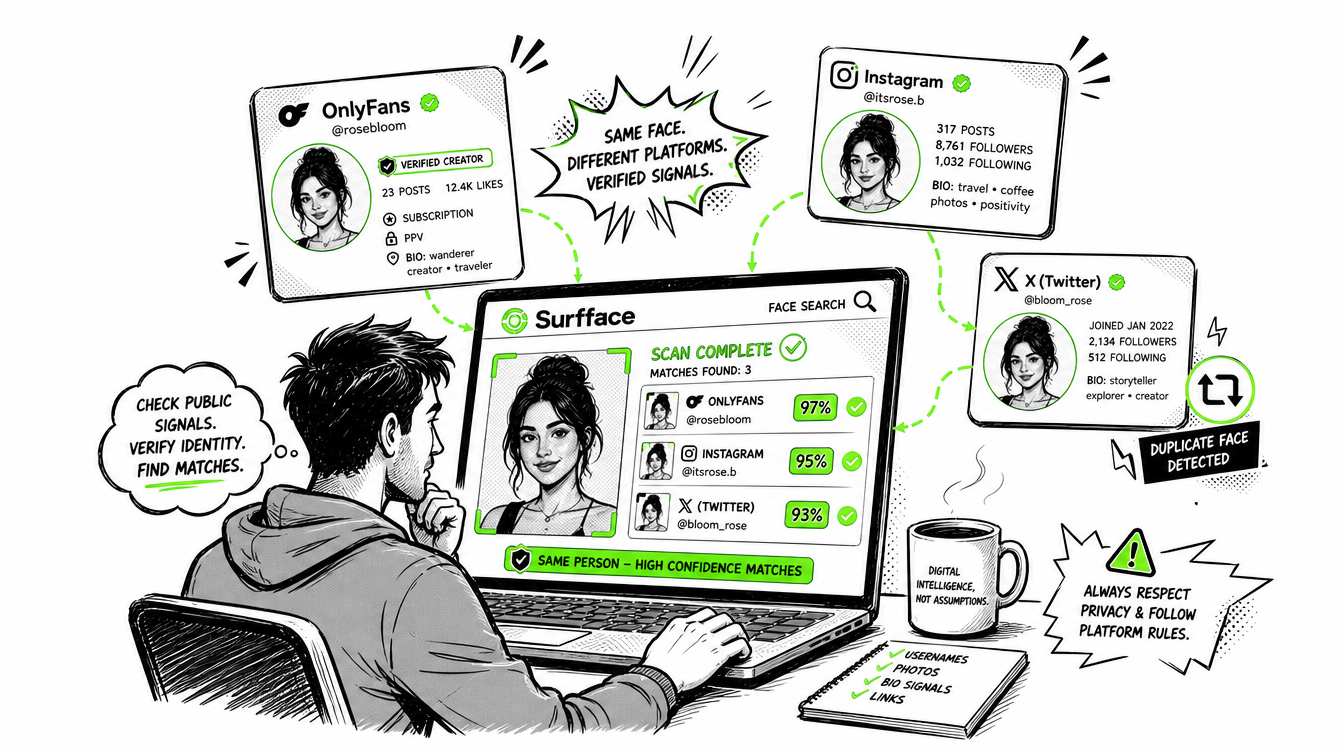
OnlyFans face search helps you check whether a creator’s public face photo appears across open web sources, creator promo pages, social profiles, blogs, news pages or other publicly available places online. This is useful when you want to understand public creator exposure from one photo instead of searching by name, username or keyword.
OnlyFans itself has limited creator discovery. It is not built as a rich creator search engine and it does not provide built-in face search. That is why users often look for third-party OnlyFans search tools, OnlyFans reverse image search methods, OnlyFans image search tools and OnlyFans profile search engines. Some tools such as FaceDigger, JuicySearch or Face-Spy even advertise face-based creator discovery.
Surfface approaches this differently. It searches publicly available sources only. For OnlyFans-related profile signals, Surfface focuses on public creator exposure where a visible face appears in a public profile avatar or other open-source context. If a creator does not show a face publicly, Surfface does not use hidden or private OnlyFans content to make that creator searchable.
The goal is simple: help users check public creator profile signals while keeping privacy, consent and responsible use in mind.
What is OnlyFans face search?
OnlyFans face search means searching by a face image instead of typing a creator’s username, display name or niche keyword. In practice, it helps answer one question: where does this public face appear online?
A face-based search can surface public signals such as:
- A creator profile with a visible public avatar
- Social profiles connected to the same creator identity
- Public promo pages
- Public creator directories
- Mentions on blogs or news pages
- Reused public images across open websites
This is different from a basic OnlyFans profile search. A normal profile search depends on text. You need the right name, username, handle or keyword. OnlyFans search by face starts from the image itself, which can be more useful when the name is unknown, misspelled, changed or different across platforms.
Why OnlyFans discovery is difficult
OnlyFans is not designed like a traditional social network with deep public discovery. Users often need a direct creator link or an exact username to find a profile. OnlyFans lacks robust native search functionality and that discovery limitations are partly tied to safety concerns around adult content exposure. This creates visibility problems for creators who rely on outside promotion to be found.
That is why the creator ecosystem around OnlyFans often depends on external discovery channels. Creators promote on X, Reddit, Instagram, TikTok, personal websites, link-in-bio pages, search directories and fan communities. For creators who want to grow, public exposure is part of the business.
This creates the need for tools that can connect public signals across the open web. A user may not know a creator’s handle, but they may have a face photo. A creator may use different aliases across different platforms. A public profile may be easy to miss through normal keyword search. Face search can help connect those public dots.
OnlyFans reverse image search vs OnlyFans search by face
Many users use the terms OnlyFans reverse image search and OnlyFans face search as if they mean the same thing. They are related, but they are not identical.
OnlyFans reverse image search
Reverse image search usually looks for exact or near-exact copies of an image. It may work when the same photo appears on a public profile, website, blog or directory.
It is useful when:
- The same image was reused without many edits
- The image is public and indexed
- The image has not been heavily cropped, filtered or resized
- The page is accessible to search engines
But reverse image search can fail when the same person appears in a different photo, angle, crop, hairstyle, background or lighting. It is mainly image-copy search, not always person-focused search.
OnlyFans search by face
OnlyFans search by face focuses on the person in the image. The goal is not only to find the same file. The goal is to find public appearances of the same face or a highly similar face across public sources.
This can be more useful when:
- The creator uses different photos on different platforms
- The public avatar is not the same image you have
- The photo was cropped or edited
- The creator has public exposure outside OnlyFans
- The creator uses different usernames across the web
That is why people search for terms like onlyfans face recognition search, onlyfans image search and reverse image search OnlyFans. The real intent is usually the same: find public creator signals from a face image.
How Surfface checks public creator profile signals
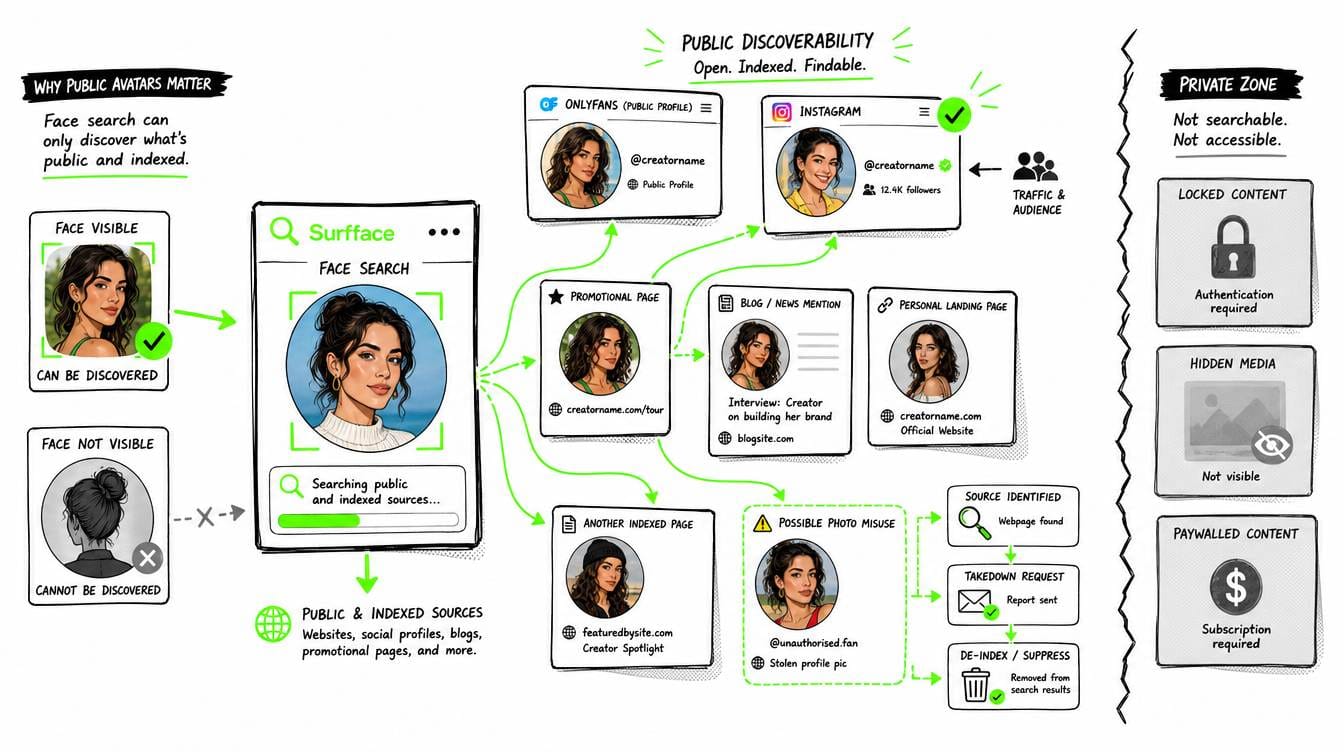
Surfface is a face search engine that helps users find where a face appears online. It searches indexed public sources such as websites, blogs, news pages, social profiles and available U.S. public records like mugshots and sex offender registries.
For OnlyFans-related discovery, Surfface focuses on public and open-source information. The system does not need private OnlyFans access to produce useful public signals. It can help when a creator’s face is already publicly visible and connected to public web exposure.
What Surfface may find
Surfface may help identify:
- Public creator profile signals
- Open web pages connected to a creator identity
- Social profiles where the same face appears
- Public avatar-based matches
- Public promo pages or mentions
- Related public context from indexed sources
This is useful because creators often build public funnels. A creator may have an OnlyFans link in a social bio, a public promo page, an X account, a Reddit presence, an Instagram profile or a personal landing page. Surfface can help connect those public signals if the face is visible and indexed.
What Surfface does not do
Surfface does not unlock private content. It does not search private messages. It does not bypass paywalls. It does not expose hidden OnlyFans media. It does not include creators in face search results if the relevant public profile does not show a face in the visible avatar.
This distinction is important. Public discovery should stay aligned with public creator choices. If a creator chooses to show their face publicly, that is a public discoverability signal. If a creator does not show their face publicly, that choice should be respected.
Why public avatars matter
A public avatar is one of the clearest signals in creator discovery. It is visible before subscription. It is part of the creator’s public identity. It helps users recognize the account and it helps creators build trust, continuity and audience recall.
For Surfface, public avatar visibility matters because it creates a privacy-first boundary. If a creator shows a face in a public avatar and that profile also has public exposure elsewhere, the profile may become discoverable through public face search. If the profile does not show a face publicly, Surfface does not use private or hidden images to include it in face results.
This protects creators who want separation while helping creators who want public discovery. Surfface also gives everyone, including OnlyFans creators, the option to request face search opt-out and suppression.
In practice, creators more often ask to de-index specific unwanted public content such as outdated images, old photos or photos taken before cosmetic procedures.
Surfface also helps creators locate public photo misuse, including cases where their face is copied, reposted or used without permission. When unwanted matches appear, Surfface can help identify the source and guide the creator through takedown or removal steps.
Most creators still prefer to stay discoverable because public face search can support recognition, audience growth and traffic to their official profiles.
Creator discoverability can be a benefit
For many creators, being searchable is not a risk. It is a growth channel.
OnlyFans creators often compete for attention across crowded platforms. Public discovery helps users find the right creator faster. It also helps creators build recognizable personal brands across different channels. Research on OnlyFans creators has described the platform as part of professional social media content creation where visibility, boundary-setting and creator autonomy are central factors.
A privacy-aware OnlyFans creator search should support both sides:
- Creators who want to be found should benefit from public discoverability.
- Creators who do not show their face publicly should not be forced into face-based discovery.
That is the difference between responsible discovery and invasive exposure.
Third-party OnlyFans search tools: Useful, but check privacy
Because OnlyFans discovery is limited, many third-party OnlyFans search websites exist. Some focus on names, usernames, locations, niches or creator categories. Some advertise image upload search or lookalike discovery. For example, JuicySearch advertises an OnlyFans search engine with image upload discovery for creators with a similar look.
These tools can be useful, but users should be cautious. Before using any OnlyFans face recognition search or image search tool, check its privacy and safety practices.
A tool that promises to find anyone from any private image is a red flag. A responsible tool should clearly limit itself to public information, adult-only use and respectful discovery.
How to search for someone on OnlyFans responsibly
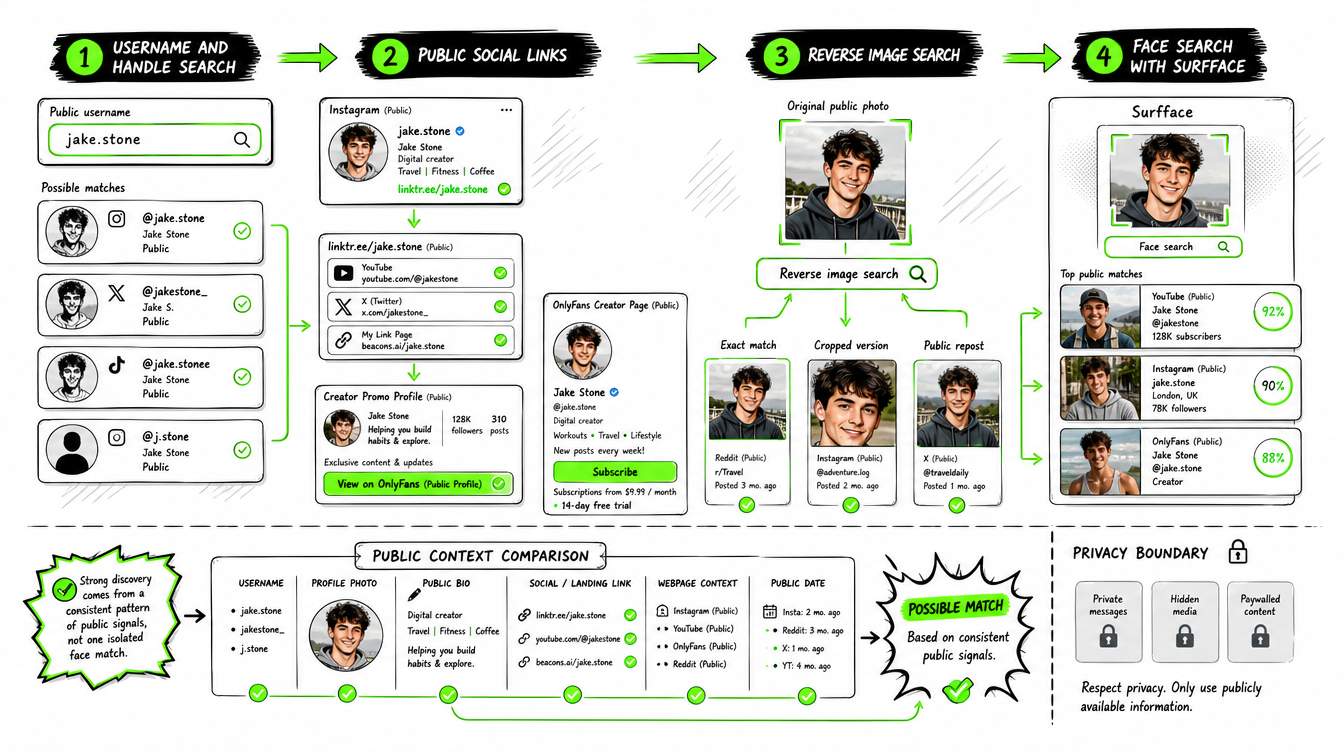
If you want to know how to search for someone on OnlyFans using public signals, start with the least invasive method and move carefully.
- Try username and handle search first. If you know the creator’s handle, search it directly. Check exact spelling, alternate spellings and usernames used on other social profiles. Many creators use the same or similar handle across platforms.
- Check public social links. Creators often promote through public channels. Look at public bios, link pages and creator promo accounts. If the creator wants to be found, their public funnel will often point to the subscription page.
- Use OnlyFans reverse image search. If you have a public image, try a reverse image search to check whether that exact photo appears elsewhere. This can help locate public pages, reposts or creator directories.
- Use OnlyFans search by face. If keyword search and reverse image search are not enough, use a face-focused search tool like Surfface. Upload a clear adult face photo and check public matches across open sources. Review the results as signals, not absolute proof.
- Compare public context. Look beyond the face match. Check usernames, profile photos, public bios, links, page context and dates. Strong discovery comes from a pattern of public signals, not one isolated image.
What if no OnlyFans profile signal appears?
No result does not always mean no profile exists. It may mean the profile is private, unindexed, not connected to public pages or does not show a face publicly. It may also mean the photo quality is poor, the creator uses a non-face avatar or the public exposure is too limited to detect.
No match can still be useful because it tells you that no strong public signal was found in the indexed sources. But it should not be treated as complete proof that nothing exists online.
Face search works best when there is public exposure. If a creator is intentionally private, a responsible tool should not force discovery.
Privacy in mind, discovery that helps creators grow
Surfface only searches publicly available profiles and public web signals. For OnlyFans-related discovery, the focus is on public-facing creator signals, especially visible public avatar photos and open-source exposure.
If a profile does not show a face in the public avatar, Surfface does not include it in face search results. Even if other images exist elsewhere, hidden or private OnlyFans content is not used for face search.
This keeps discovery aligned with creator choice. Public creators who want visibility can benefit from being easier to find. Creators who avoid public face exposure keep that boundary intact.
To keep the platform safe and respectful, only adult face uploads are allowed. Explicit content uploads are not supported. Use Surfface responsibly, with proper consent and in good faith.
Q&A
OnlyFans itself does not provide built-in face search. You need a third-party face search or image search tool. Surfface can help by searching public web sources and public profile signals where available.
No. Reverse image search usually looks for copies of the same image. Face search focuses on the person in the image and may find public matches even when the photo is different.
No. Surfface does not unlock private content, bypass paywalls or search hidden media. It focuses on publicly available sources and public profile signals.
Many creators rely on public discovery to grow their audience. Public face visibility can help users recognize the creator across platforms and find official public links faster.
Conclusion
OnlyFans face search is most useful when it is public, limited and responsible. It helps users check open web creator signals from a face photo while respecting the difference between public visibility and private content.
Surfface supports that balance. It helps discover public face matches across indexed web sources, social profiles, news, blogs and available U.S. public records. For OnlyFans-related signals, it focuses on public creator exposure and visible public avatars, not private content.
Use OnlyFans face search to understand public creator presence, verify open-source signals and discover creators who choose to be publicly searchable.
Please note: uploading faces of people under 18, explicit images or adult-content materials is prohibited and automatically blocked. Misuse of this feature may lead to an account ban.

Stanley Wiggins
Stan leads product marketing at Surfface, bringing a mix of experience in OSINT and private investigations, along with expertise in digital marketing and product management.