Advanced Image Search Techniques: How to Search by Image Like an OSINT Expert
Stanley Wiggins
August 28, 2026
7 min read
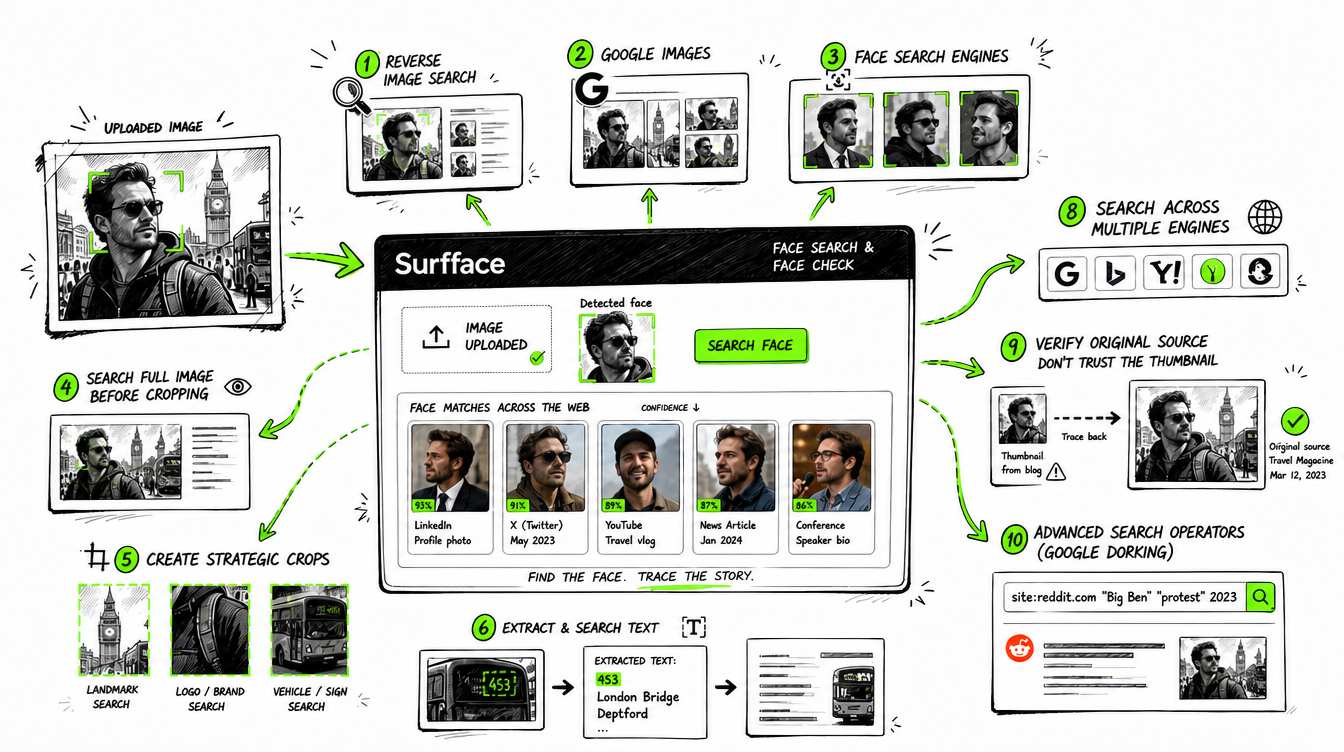
Effective image search starts with choosing the right technique. Use reverse image search to find copies of the same photo, general search engines to investigate objects and context and specialized face search engines like Surfface to find where a person’s face appears online. For difficult searches, test multiple crops, extract clues from the image and combine visual results with targeted text queries.
Searching an image is easy. Finding useful evidence is harder.
One tool might locate an exact copy of a photo but miss the same person in a different picture. Another might identify a building or product but ignore the face. Advanced image search techniques solve this problem by combining several search methods instead of relying on one upload.
Here is how to search by image more effectively.
1. Start with the right type of image search
There are three main ways to search an image online.
Reverse image search
Traditional image reverse search tools such as TinEye look for identical or visually similar copies of an image. They are useful when a photo has been reposted, resized, compressed, cropped or slightly edited.
The limitation is important: reverse image search usually analyzes the entire image. If the same person appears in a completely different photo, it may not recognize the connection.
General image search engines
Google Images, Google Lens, Yandex Images and Bing Visual Search analyze more than exact duplicates. They can use objects, text, surroundings and other visual details to return related pages.
They may also return face-related results but their performance is inconsistent. A search can change depending on the crop, background, image quality, search location and other context.
Specialized face search engines
A face search engine focuses on the person rather than the whole image. It tries to find the same face across different photos even when the angle, crop, lighting, hairstyle or background has changed.
Services such as Surfface, PimEyes and FaceCheck ID are built specifically for face discovery. They can be more effective than traditional reverse image tools when you need to find the same person in different photos.
Surfface takes a broader approach. It searches its own image index and orchestrates multiple third-party discovery tools including Google, Yandex and other face search services. This lets users check more potential sources through one search instead of uploading the same photo to several platforms manually.
That is why Surfface is often the easiest and most comprehensive place to start a face search, especially when all you have is a photo.
2. Search the full image before cropping it
Begin with the original image. It contains clues that may disappear after editing:
- Signs and street names
- Logos
- Usernames
- Uniforms
- Vehicle plates
- Architecture
- Distinctive furniture
- Event banners
- Visible products
Upload the complete image to Google Lens, Yandex Images or another general image search engine. Review both visual matches and pages that contain related images.
A full image often works best when the background tells a story. A restaurant sign, conference badge or unusual building may identify the source faster than the face.
3. Create several strategic crops
One of the most effective image search techniques is to divide a photo into separate searchable clues.
Create versions that focus on:
- The complete image
- The person’s face
- Clothing or accessories
- A logo or sign
- The background or location
- Any visible text
Run each crop separately. Search engines may produce completely different results for each one.
For face discovery, test a crop that clearly shows the head and upper shoulders. If that fails, try a slightly wider crop that preserves clothing and background context. A crop that is too tight may remove signals that general image engines need.
Google Lens can sometimes find people with a public presence but it is not a dedicated face search engine and may limit or avoid certain face-based results. You may need to experiment with the crop to get useful pages. This manual process can take time.
Surfface reduces that trial and error by concentrating on the face and searching its own index alongside supported external discovery services.
4. Extract and search every piece of text
Visible text can turn an uncertain image search into a direct lead.
Use optical character recognition through Google Lens or another OCR tool to extract:
- Usernames
- Names
- Business signs
- Event titles
- Product labels
- Website addresses
- Phone numbers
- Dates
Then search the text in quotation marks. For example:
"username123"
"Spring Technology Forum 2025"
"exact phrase from a banner"
Quotation marks tell the search engine to look for the exact wording. Try both the complete phrase and its most distinctive part.
Check spelling carefully. OCR can confuse similar characters such as O and 0 or I and l.
5. Use Google dorking for advanced image search
Google dorking means using search operators to narrow results. It sounds technical but the basic techniques are simple.
Search within one website
site:instagram.com "username"
site:tiktok.com "full name"
site:example.com "event title"
Search for image files
"full name" filetype:jpg
"event title" filetype:png
Search page titles or URLs
intitle:"full name"
inurl:profile "username"
Exclude irrelevant results
"full name" -pinterest -stock -templateYou can combine these operators with clues discovered in the image:
site:newswebsite.com "full name" "city"Google dorking is powerful when you already have a name, username, location or organization. It is much less efficient when you have nothing but an unknown face. You may spend hours trying possible terms without knowing whether you are following the right person.
In that situation, run a face search first. A possible Surfface match may reveal the public page or context you need for more targeted investigation.
6. Search across more than one engine
No image search engine indexes the entire web. A failed search does not prove that the image or person is absent online.
You can manually test tools such as Google Lens, Yandex Images, TinEye, PimEyes and FaceCheck ID because each has different coverage and strengths. The drawback is time. You must upload the photo repeatedly, experiment with crops and compare results across several platforms.
7. Use Surfface when the face is the main clue
Surfface is designed for searches where a face matters more than the rest of the photo. Unlike tools that rely on one index or search method, Surfface combines its own image index with third-party discovery services including Google, Yandex and other face search tools.
This orchestration makes Surfface an easier and more comprehensive starting point. Instead of uploading the same photo to multiple services, testing crops and comparing scattered results manually, you can begin with one search and review possible matches in one place.
Surfface can help locate appearances across public social profiles, news, blogs and other indexed websites. For U.S.-focused safety searches, it can also surface possible matches from dedicated mugshot, criminal-record and registered sex offender sources where available.
8. Verify the source instead of trusting the thumbnail
A convincing thumbnail can still lead to the wrong conclusion.
Open the source page and check:
- Is the face actually shown on the page?
- Does the publication date make sense?
- Is the page original or copied?
- Do the name, age and location fit?
- Is the image presented as a real photo, illustration or AI-generated content?
- Are several independent sources repeating the same claim?
Do not treat visual similarity alone as confirmation. Look for at least two independent signals such as the same face plus a matching username, location, employer or linked profile.
9. Keep an image search log
For complex searches, record what you tested:
- Original image URL
- Search date
- Tools used
- Crops tested
- Queries and operators
- Possible source pages
- Confirmed and rejected leads
This prevents repeated work and makes your reasoning easier to review. It also helps distinguish facts from assumptions.
Use image search responsibly. Investigate public information for legitimate purposes and never use results for harassment, stalking, threats or unlawful discrimination.
Q&A about image search techniques
Upload the image to Google Lens, Yandex Images, Bing Visual Search or TinEye. Start with the full image then test separate crops of the face, background, objects and visible text. If the face is your main clue, use a specialized face search engine such as Surfface.
Surfface, PimEyes, Lenso AI and FaceCheck ID are established options for searching a face across public websites. Surfface is often the easier place to start because it combines its own image index with third-party tools including Google, Yandex and other face search services. This provides broader discovery through one search instead of requiring you to check every platform separately.
The best technique depends on your goal. Use reverse image search for copies of the same photo, general image search for objects and context and face search for the same person in different photos.
Upload a clear crop of the adult face to Surfface. It can search for possible appearances across indexed public sources even when you do not know the person’s name. You can then investigate promising results with targeted text searches.
Advanced image search combines multiple crops, search engines, OCR, face search and operators such as site:, filetype: and quotation marks. It uses every visible clue instead of depending on a single reverse image upload.
Google Lens may return public figures, similar faces or pages connected to a photo. Results vary and face-based searches may be limited. Testing wider and tighter crops can help but a dedicated face search engine is usually more practical when the face is the main subject.
Reverse image search looks mainly for copies or visually similar versions of an entire image. Face search focuses on facial similarity and may find the same person in different photos, settings and crops.
Google Lens, Bing, Yandex and TinEye provide free search options. Specialized face search services may let you preview possible matches for free but usually charge to reveal full source details because face-search infrastructure and image indexing are expensive.

Stanley Wiggins
Stan leads product marketing at Surfface, bringing a mix of experience in OSINT and private investigations, along with expertise in digital marketing and product management.